
Why 2607 matters
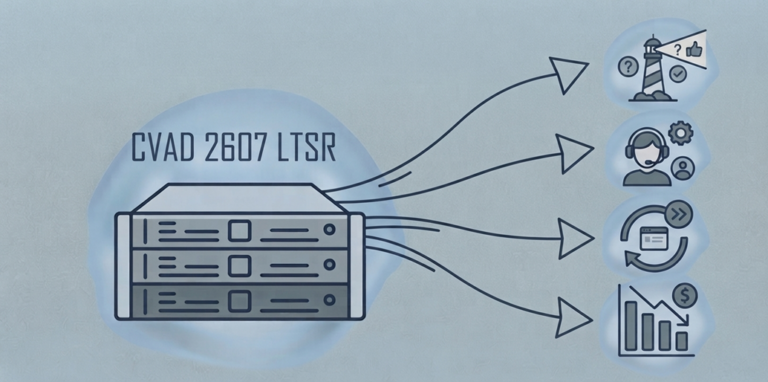
Citrix Virtual Apps and Desktops (CVAD) 2607 is the new Long Term Service Release (LTSR), released in August 2026. Its value lies less in any single feature than in what it changes about daily operations: how you find configuration drift, how users report problems, how sessions come back, and how much idle capacity you pay for.
An LTSR rolls up the Current Releases shipped since the previous one, so 2607 brings the 2511 and 2603 features to LTSR sites for the first time. Four of them matter most to the teams who administer and support Citrix. Each is useful, and each has a catch that the launch material does not dwell on.
Citrix Advisor: A built-in health check, if you run it
Citrix Advisor checks your site from Web Studio and returns recommendations in five categories: Security, Reliability, Performance, Operational Excellence and Cost Optimization. Examples include VDAs and Workspace app versions past end of life, HTTP host connections and StoreFront URLs, missing restart schedules, and applications hosted on a single VDA. Where the fix is simple, a Fix Now action applies it in the console; otherwise Advisor links to the relevant documentation.
The catch: on premises, Advisor runs on demand. A Full Administrator clicks Run check. The automated weekly scans, 90-day report history and Home page widget that Citrix announced in August 2026 are Citrix DaaS features. StoreFront checks also need Infrastructure Monitoring 2603 or later, and Citrix advises waiting six hours after StoreFront changes before rechecking.
Our advice: put Advisor on the change calendar. Run it before and after every maintenance window and attach the results to the change record. It evaluates configuration, not live user experience, so it complements your monitoring rather than replacing it.
Citrix Virtual Desktop Assistant: First-line support inside the session
The Virtual Desktop Assistant is a system tray app installed with Workstation and Server VDAs. Users can check CPU, memory and network, end unresponsive apps, clear temporary files, find files over 100 MB, and test audio, camera, keyboard and USB. 2607 adds a Graphics page showing the session’s HDX settings, plus alerts when CPU or memory stays above 70% for 30 seconds or the profile container passes 70% full.
For the service desk, two features matter more than the rest. Users can record the problem as an MP4 clip, and, where Always On Tracing is enabled, export a support bundle of session logs for the ticket. That attacks the most expensive step in VDI troubleshooting: reproducing the fault.
The catch: the tray icon appears on every VDA after the post-install restart unless you disable it by policy. Brief the service desk before rollout, decide whether you want the notifications, and check where recordings land. The default is the user’s Videos folder, which may sit inside a redirected or synced profile.
Fast Application Reconnect: Disconnect instead of log off
Citrix documents this as a new policy, Disconnect published app session after closing last app. When enabled, closing the last published app disconnects the session instead of logging it off. The next launch reconnects to that session and skips the full logon, profile load and policy processing.
It is disabled by default and requires a 2607 or later Windows VDA. A CTX-DSMRELAUNCH tag marks the published apps that should reopen automatically. For users who open and close the same app all day, the gain is immediate.
The catch: this is a capacity decision, not a cosmetic one.
- Disconnected sessions still consume memory on multi-session hosts. Citrix strongly recommends disconnect timers and WEM Multi-Session Optimization, which trims CPU and memory for disconnected sessions after one minute.
- A draining host is not empty until its disconnected sessions log off, which slows Autoscale power-off and erodes the savings in the next section.
- Profile containers stay attached while a session is disconnected. Users who also launch from a second delivery group can hit profile lock contention.
Pilot it on one delivery group with a short disconnect timer, and measure host density before and after.
Cost management: Better estimates, fewer idle machines
2607 gives administrators four practical cost levers:
Azure cost estimate at design time. The Azure catalog Summary page shows the estimated monthly cost of the catalog’s VMs at Azure list price. With the Microsoft.Consumption/pricesheets/read permission on the host connection, it uses your contracted pricing instead.
- Autoscale holiday schedules. A holiday plug-in powers machines down on dates you set, in Studio or PowerShell. The delivery group needs a time zone, and overrides are generated at 22:00 the day before, so late changes miss the next day.
- Amazon WorkSpaces Core billing choice. MCS can now provision WorkSpaces Core Managed instances on monthly flat-rate or hourly billing.
- Advisor cost checks. Advisor flags eligible delivery groups without Autoscale and dedicated machines or apps unused for 30 days.
The catch: these are guardrails, not FinOps. The Azure figure is a planning number, so reconcile it against actual consumption. Hourly versus monthly billing only saves money if you know each pool’s real usage hours.
Other changes worth knowing
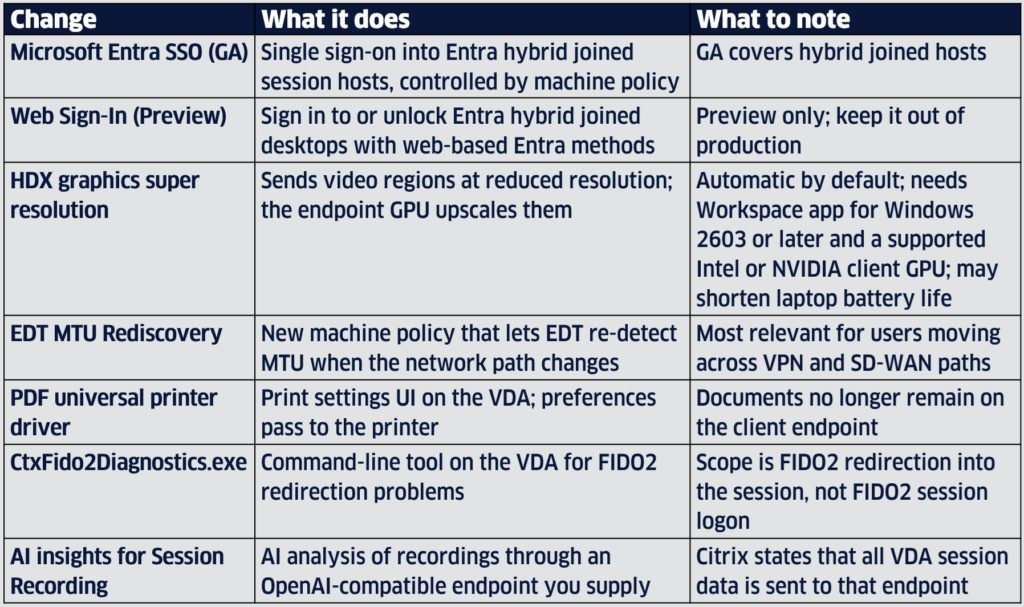
The rest of the release is incremental, but several items will land on an administrator’s desk.
What this means for your upgrade plan
- LTSR is no longer a decade-long parking spot. Citrix’s lifecycle policy now ends an LTSR three years after release: 2607 LTSR on 17 August 2029 and 2507 LTSR on 18 August 2028. Once you allow for adoption lag, plan on an LTSR upgrade roughly every two years, and automate the testing that makes it routine.
- 2203 LTSR reaches end of life on 23 March 2027. That is six months away. If you are still on it, 2607 is the target, and the window for a tested, unhurried upgrade is closing. 2402 LTSR sites have until 15 April 2029.
- Controllers alone change little for users. Advisor and the Azure cost estimate arrive with the Delivery Controller and Web Studio. The Assistant, the disconnect policy and super resolution need current VDAs, and super resolution also needs current Workspace app.
- Separate what is in your LTSR from what is in the cloud. Items marketed alongside 2607 include DaaS-only capabilities (Advisor weekly scans), previews (Web Sign-In) and features that depend on a third-party service (Session Recording AI insights). Build the business case on what your deployment model actually includes.
- Put AI features through data governance first. Sending session recordings to an external model endpoint is a privacy decision. In regulated sectors, involve security, privacy and legal before anyone enables it.
Our recommendation
Upgrade to 2607 LTSR on a plan, not against a deadline. For most estates we recommend this sequence:
- Baseline the current site and fix known issues before the upgrade, not after.\
- Upgrade Delivery Controllers, Web Studio and StoreFront, then run Advisor and close the High impact items.
- Pilot 2607 VDAs on one delivery group with the Assistant, the disconnect policy and disconnect timers. Measure logon time, reconnect time and host density before and after.
- Enable Autoscale on every eligible delivery group, load next year’s holidays, and require a cost estimate in every new Azure catalog design.
- Make Advisor a standing task after every change window.
Samana Group plans and delivers Citrix LTSR upgrades and runs Citrix environments day to day through our managed services and the SAMM monitoring platform. If you want a second set of eyes on your 2607 plan, talk to our architects.

German Toro
Lead Engineer
Samana Group
 Download our whitepaper!